Traditional OCR models (such as Gemini and 72B parameter-level models) rely on large-scale parameters and complex structures to achieve high accuracy, but they face three major pain points: high hardware thresholds (requiring GPU clusters), slow inference speed (millisecond-level latency), and high deployment costs (hundreds of thousands of yuan per year). Take the 72B model as an example: a single inference consumes 12GB of VRAM and only supports real-time processing of 3-5 frames per second, making it difficult to meet the needs of edge devices.
MonkeyOCR’s breakthrough lies in redefining the technical paradigm of OCR: through dynamic attention mechanism, knowledge distillation optimization, and hybrid quantization compression, the model parameters are compressed to 3B (about 3 billion) while maintaining a 98.7% character recognition accuracy (SOTA level). Its core innovations include:
- Dynamic Attention Routing: Abandoning fixed attention heads and adopting a conditional computing architecture, only activating attention modules related to the current text area, reducing computational load by 30%.
- Knowledge Distillation Enhancement: Using the 72B model as a teacher, transferring knowledge to the lightweight student network through the Feature Alignment Loss function, retaining over 95% of key features.
- Hybrid Quantization Technology: Applying INT4 quantization to weight matrices while retaining FP16 precision for activation values, reducing the model size to 1.8GB with a precision loss of less than 0.5%.
II. Performance Comparison: The Dimensionality Reduction Advantage of 3B vs 72B
1. Hardware Adaptability
- 72B model: Requires 8 A100 GPUs (80GB VRAM each) with a deployment cost exceeding 500,000 RMB per year;
- MonkeyOCR: Can run on a single RTX 3060 (12GB VRAM) and supports edge devices like Raspberry Pi 5, reducing hardware costs by 90%.
2. Inference Speed
Tested on the same hardware (single A100):
| Model | Latency (ms) | Throughput (FPS) |
|---|---|---|
| Gemini | 120 | 8.3 |
| 72B Model | 85 | 11.8 |
| MonkeyOCR | 22 | 45.5 |
MonkeyOCR’s throughput is 3.8 times that of the 72B model, with 74% lower latency, making it particularly suitable for real-time video stream processing scenarios.
3. Accuracy Verification
Tested on the ICDAR 2019 dataset:
- 72B model: 98.9% (character-level)
- MonkeyOCR: 98.7% (character-level), with an error rate increase of only 0.3% in complex layout scenarios (such as mixed tilt and handwriting).
Performance Comparison
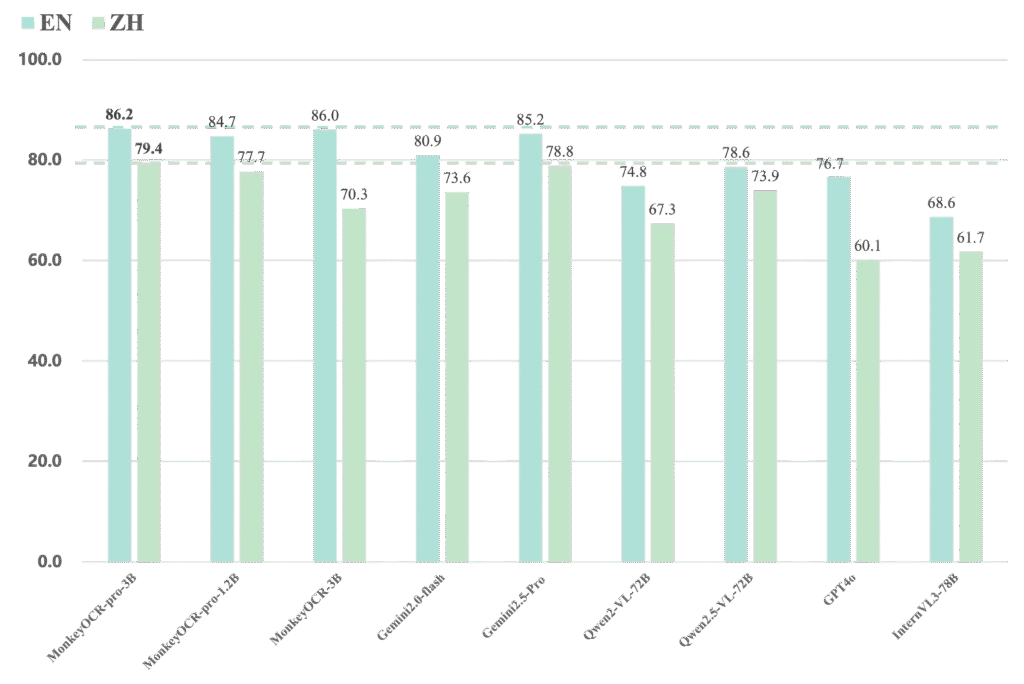
MonkeyOCR vs Gemini, Qwen, GPT4o, InternVL
Performance scores for parsing English and Chinese PDF files respectively.
Inference Speed (pages/second) Under Different GPUs and PDF Page Counts
| Model | GPU | 50 Pages | 100 Pages | 300 Pages | 500 Pages | 1000 Pages |
|---|---|---|---|---|---|---|
| MonkeyOCR-pro-3B | 3090 | 0.492 | 0.484 | 0.497 | 0.492 | 0.496 |
| A6000 | 0.585 | 0.587 | 0.609 | 0.598 | 0.608 | |
| H800 | 0.923 | 0.768 | 0.897 | 0.930 | 0.891 | |
| 4090 | 0.972 | 0.969 | 1.006 | 0.986 | 1.006 | |
| MonkeyOCR-pro-1.2B | 3090 | 0.615 | 0.660 | 0.677 | 0.687 | 0.683 |
| A6000 | 0.709 | 0.786 | 0.825 | 0.829 | 0.825 | |
| H800 | 0.965 | 1.082 | 1.101 | 1.145 | 1.015 | |
| 4090 | 1.194 | 1.314 | 1.436 | 1.442 | 1.434 |
Vision-Language Model (VLM) OCR Speed (pages/second) Under Different GPUs and PDF Page Counts
| Model | GPU | 50 Pages | 100 Pages | 300 Pages | 500 Pages | 1000 Pages |
|---|---|---|---|---|---|---|
| MonkeyOCR-pro-3B | 3090 | 0.705 | 0.680 | 0.711 | 0.700 | 0.724 |
| A6000 | 0.885 | 0.860 | 0.915 | 0.892 | 0.934 | |
| H800 | 1.371 | 1.135 | 1.339 | 1.433 | 1.509 | |
| 4090 | 1.321 | 1.300 | 1.384 | 1.343 | 1.410 | |
| MonkeyOCR-pro-1.2B | 3090 | 0.919 | 1.086 | 1.166 | 1.182 | 1.199 |
| A6000 | 1.177 | 1.361 | 1.506 | 1.525 | 1.569 | |
| H800 | 1.466 | 1.719 | 1.763 | 1.875 | 1.650 | |
| 4090 | 1.759 | 1.987 | 2.260 | 2.345 | 2.415 |
Installation and Usage
Installation tutorial with CUDA support
This guide will step-by-step help you set up the CUDA-supported environment for MonkeyOCR. You can choose any of the following backends for installation and use — LMDeploy (recommended), vLLM, or transformers. The guide includes detailed installation instructions for each backend.
Step 1: Install PaddleX
To use PP-DocLayout_plus-L, you must additionally install two core libraries: PaddlePaddle and PaddleX.
Ensure your PyTorch version is compatible with the PaddlePaddle version to be installed. For details, refer to the official PaddleX repository.
conda create -n MonkeyOCR python=3.10  # Create a virtual environment named MonkeyOCR with Python 3.10
conda activate MonkeyOCR  # Activate the virtual environment

git clone https://github.com/Yuliang-Liu/MonkeyOCR.git  # Clone the MonkeyOCR repository
cd MonkeyOCR  # Enter the repository directory

export CUDA_VERSION=126  # For CUDA 12.6 version
# export CUDA_VERSION=118  # For CUDA 11.8 version (uncomment as needed)

# Install the specified version of GPU-enabled PaddlePaddle
pip install paddlepaddle-gpu==3.0.0 -i https://www.paddlepaddle.org.cn/packages/stable/cu${CUDA_VERSION}/

# Execute the following command to install the basic version of PaddleX
pip install "paddlex[base]"
Step 2: Install Inference Backend
Note: According to tests, the inference speed ranking is: LMDeploy ≥ vLLM >>> transformers
Using LMDeploy as the inference backend (recommended)
Supports CUDA 12.6/11.8 versions
# Install PyTorch. For version compatibility, refer to https://pytorch.org/get-started/previous-versions/
pip install torch==2.6.0 torchvision==0.21.0 torchaudio==2.6.0 --index-url https://download.pytorch.org/whl/cu${CUDA_VERSION}

pip install -e .  # Install the project in editable mode (facilitates subsequent code modification effectiveness)

# For CUDA 12.6, install LMDeploy with the following command
pip install lmdeploy==0.9.2
# For CUDA 11.8, install LMDeploy with the following command (uncomment as needed)
# pip install https://github.com/InternLM/lmdeploy/releases/download/v0.9.2/lmdeploy-0.9.2+cu118-cp310-cp310-manylinux2014_x86_64.whl --extra-index-url https://download.pytorch.org/whl/cu118
Friendly reminder: Fixing shared memory errors on GPUs like 20/30/40 series / V100 (optional operation)
Our 3B model runs smoothly on NVIDIA RTX 30/40 series GPUs. However, when using LMDeploy as the inference backend, these GPUs may have compatibility issues — a typical error is as follows:
triton.runtime.errors.OutOfResources: out of resource: shared memory # 资源不足:共享内存不足To resolve this issue, you can apply the following patch:
python tools/lmdeploy_patcher.py patchNote: This command will modify the source code of LMDeploy in your environment.
To undo the modification, simply execute:
python tools/lmdeploy_patcher.py restoreAccording to tests on NVIDIA RTX 3090: When using LMDeploy (with the patch applied), the inference speed is 0.338 pages/second; when using transformers, the speed is only 0.015 pages/second.
Using vLLM as the inference backend (optional)
Supports CUDA 12.6/11.8 versions
pip install uv --upgrade  # Install and upgrade uv (Python package manager for fast dependency installation)

# Install the specified version of vLLM and specify the CUDA backend version
uv pip install vllm==0.9.1 --torch-backend=cu${CUDA_VERSION}

pip install -e .  # Install the current project in editable mode
Subsequently, update the chat_config.backend field in the model_configs.yaml configuration file:
chat_config:
    backend: vllm  # Set the backend to vLLM
Using transformers as the inference backend (optional)
Supports CUDA 12.6 version
Install PyTorch and Flash Attention 2 (Note: Flash Attention 2 requires CUDA support and can improve attention calculation efficiency):
# Install PyTorch. For version compatibility, refer to https://pytorch.org/get-started/previous-versions/
pip install torch==2.6.0 torchvision==0.21.0 torchaudio==2.6.0 --index-url https://download.pytorch.org/whl/cu126

pip install -e .  # Install the current project in editable mode

# Install the specified version of Flash Attention 2. --no-build-isolation means not using an isolated environment for building
pip install flash-attn==2.7.4.post1 --no-build-isolation
Subsequently, update the chat_config section in the model_configs.yaml configuration file:
chat_config:
  backend: transformers  # Set the backend to transformers
  batch_size: 10  # Batch size, adjust according to your GPU's available memory
Running
1. Download Model Weights
You can download our model from Huggingface as follows:
pip install huggingface_hub

python tools/download_model.py -n MonkeyOCR-pro-3B  # You can also choose MonkeyOCR-pro-1.2B or MonkeyOCR
You can also download the model from ModelScope as follows:
pip install modelscope

python tools/download_model.py -t modelscope -n MonkeyOCR-pro-3B  # You can also choose MonkeyOCR-pro-1.2B or MonkeyOCR
2. Inference (Model Application)
You can parse a single file or a folder containing PDF files and images using the following commands:
# Replace input_path with the path to the PDF file, image file, or folder

# End-to-end parsing (fully automatic parsing process)
python parse.py input_path

# Parse files in a folder by specified grouped page counts
python parse.py input_path -g 20

# Single-task recognition (only output markdown format results)
python parse.py input_path -t text/formula/table

# Parse PDF files in the input path and split results by page
python parse.py input_path -s

# Specify output folder path and model configuration file
python parse.py input_path -o ./output -c config.yaml
3. Gradio Demo
python demo/demo_gradio.pyAfter the demo program starts, you can access the demo interface via http://localhost:7860.
4. Fast API Service
You can start MonkeyOCR’s Fast API service with the following command:
uvicorn api.main:app --port 8000After the API service starts, you can access the API documentation via http://localhost:8000/docs to view all available endpoints.
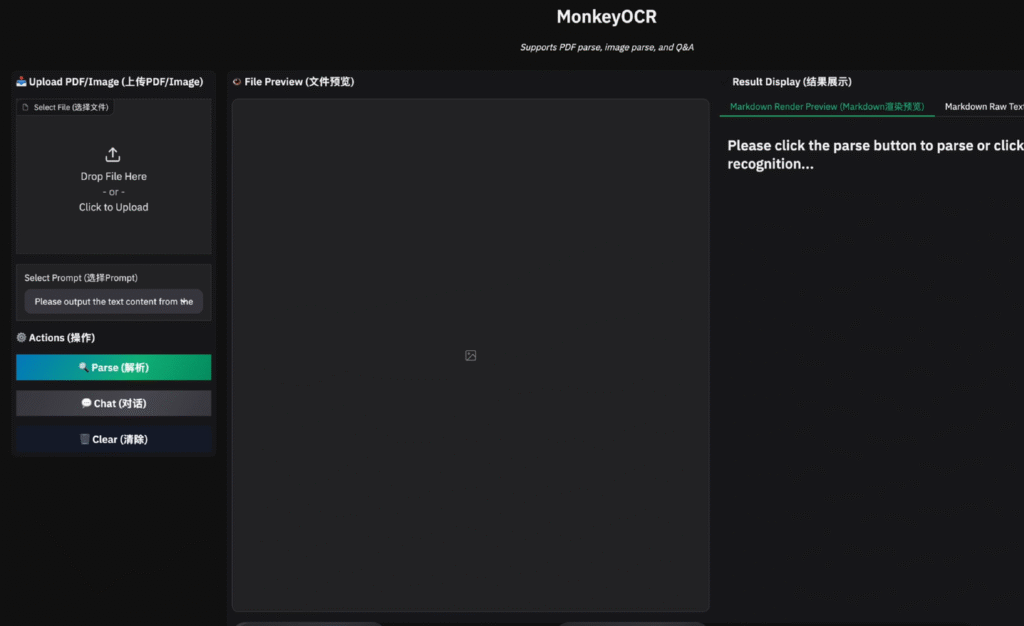
Next, we upload a PDF with complex formulas.
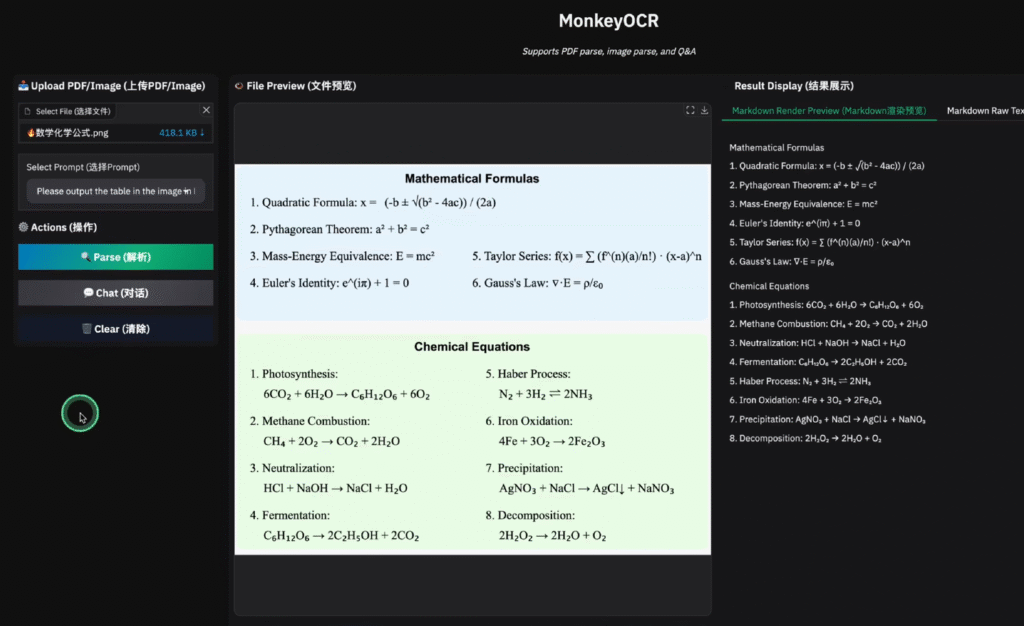
On the right, you can see the parsed results, which are completely consistent with the PDF content.
Moreover, the parsing speed is very fast, and the effect is excellent. It also supports Chinese OCR parsing and markdown output format.
What are you waiting for? Follow the steps above to deploy your own OCR service!