In Python web scraping architectures, Kafka, as a message queue middleware, is mainly used for data stream transmission and buffering, while data cleaning refers to the process of filtering, transforming, and normalizing crawled raw data. The combination of the two can significantly improve the scalability, stability, and data quality of the scraping system.
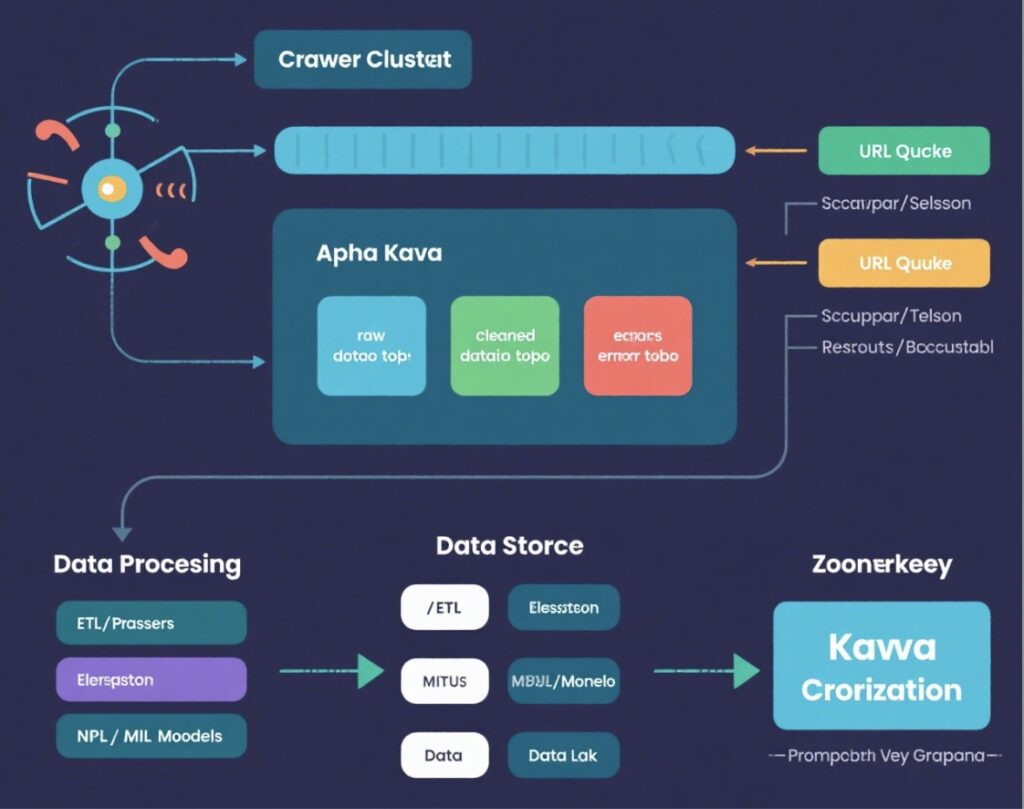
The role of Kafka in web scraping can be vividly compared to an “intelligent courier transfer station” in a community, which can be better understood through real-life scenarios:
Imagine there are many residents (equivalent to scraper clusters) in your community, who shop online a lot every day (equivalent to web data to be crawled). These goods come from different merchants (equivalent to different websites) with varying delivery times, package sizes, and types.
Without a transfer station, couriers (scrapers) would have to pile all packages at the community entrance. When residents (data processing systems) come to pick them up, chaos would ensue: fresh food packages might spoil (data becomes invalid), fragile items might get damaged (data loss), and some people might not find their packages (processing confusion).
At this point, Kafka becomes the “intelligent courier transfer station” of the community:
- All couriers (scrapers) uniformly deliver packages to the transfer station (Kafka), which has three classified shelves (corresponding to three Topics): fresh food shelf (
raw_data_topic, storing newly crawled raw data), sorted shelf (cleaned_data_topic, storing cleaned and standardized data), and problem shelf (error_topic, storing URLs that failed to be crawled and error information). - The transfer station manager (ZooKeeper) records the quantity and location of packages on each shelf to ensure order.
- Residents (data processing systems) can pick up packages as needed: those doing fresh food processing (NLP models) only take ingredients from the fresh food shelf; those doing storage organization (ETL tools) only take standardized packages from the sorted shelf; those handling complaints (monitoring systems) specifically check abnormal packages on the problem shelf.
- Even if there is a online shopping peak (surge in scraper concurrency) one day, the transfer station can temporarily cache packages, preventing couriers from waiting to unload (avoiding scrapers being blocked due to busy processing systems); if residents are temporarily unavailable (processing system failure), packages can be safely stored on the shelves and picked up when residents return (ensuring no data loss).
The core value of this “intelligent courier transfer station” is to completely decouple the two links of “receiving goods (crawling)” and “using goods (processing)” — couriers don’t need to care who will pick up the goods or when, and residents don’t need to care where the goods come from or how they arrive. Both parties collaborate efficiently through the transfer station, just like Kafka enables scrapers and data processing systems to operate independently yet seamlessly cooperate.
I. Core Roles of Kafka in Web Scraping Architecture
- Decoupling Scrapers and Cleaning Logic
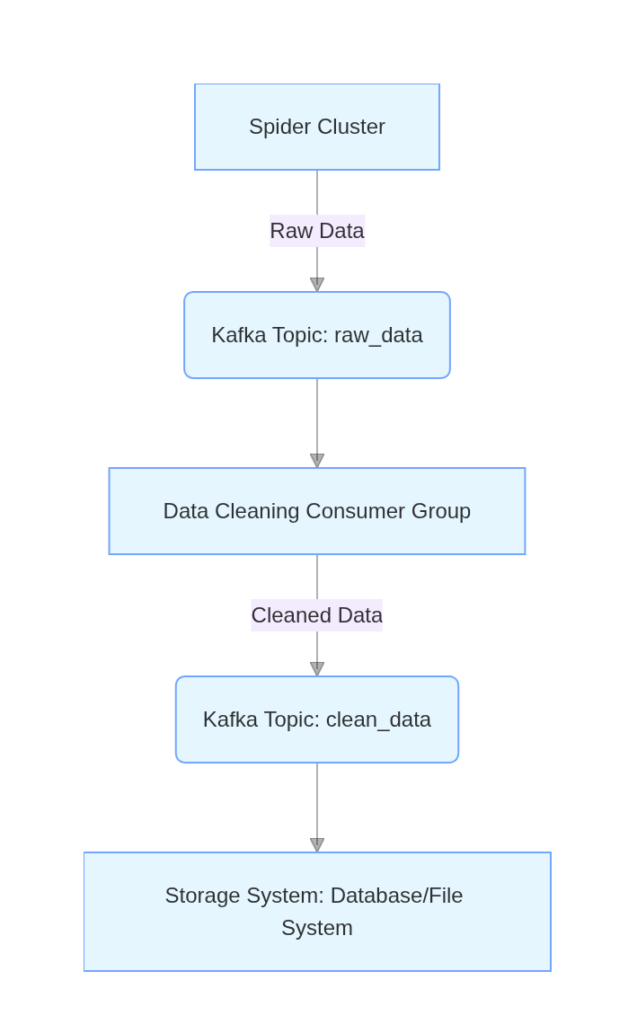
- Scrapers are responsible for crawling raw data and sending it to Kafka Topics.
- Data cleaning services, as independent consumers, read data from Kafka and store it in storage systems after processing.
- The two parties have no direct dependencies and can be independently expanded or modified.
- Traffic Peaking and Asynchronous Processing
- When the crawling speed is faster than the cleaning speed, Kafka can cache a large amount of data to prevent the cleaning service from being overwhelmed.
- Scrapers don’t need to wait for cleaning to complete and can continue crawling, improving overall throughput.
- Horizontal Scalability
- By increasing the number of instances in Kafka Consumer Groups, data can be processed in parallel, improving cleaning efficiency.
II. Core Goals of Data Cleaning
- Removing Noise Data
- Filter out useless information such as HTML tags, advertising content, and null values.
- Example: Text extracted from web pages may contain
<script>tags or line breaks.
- Format Standardization
- Unify time formats, currency units, encoding methods, etc.
- Example: Convert
January 1, 2023to2023-01-01.
- Data Validation and Correction
- Verify data integrity (e.g., whether required fields are missing).
- Fix obvious errors (e.g., phone number formats, email addresses).
- Sensitive Information Desensitization
- Mask sensitive data such as ID numbers and phone numbers.
III. Collaborative Workflow of Kafka and Data Cleaning
Installation
Since Kafka has many dependencies, this tutorial uses Docker for installation, which is convenient and time-saving. (Prerequisite: Docker is installed on the machine)
First, install ZooKeeper
docker run -d \
  --name zookeeper \
  -p 2181:2181 \
  -e ZOOKEEPER_CLIENT_PORT=2181 \
  confluentinc/cp-zookeeper:latest
Then install and start Kafka
docker run -d \
  --name kafka \
  -p 9092:9092 \
  --link zookeeper:zookeeper \  # link ZooKeeper container
  -e KAFKA_BROKER_ID=1 \
  -e KAFKA_ZOOKEEPER_CONNECT=zookeeper:2181 \  # connect to ZooKeeper
  -e KAFKA_ADVERTISED_LISTENERS=PLAINTEXT://localhost:9092 \  # c countainer outside ip address
  -e KAFKA_LISTENERS=PLAINTEXT://0.0.0.0:9092 \  # container inside ip address
  wurstmeister/kafka:latest
It will be installed automatically after a while.
$ docker pull wurstmeister/kafka
Using default tag: latest
latest: Pulling from wurstmeister/kafka
42c077c10790: Pull complete
44b062e78fd7: Pull complete
b3ba9647f279: Pull complete
10c9a58bd495: Pull complete
ed9bd501c190: Pull complete
03346d650161: Pull complete
539ec416bc55: Pull complete
Digest: sha256:2d4bbf9cc83d9854d36582987da5f939fb9255fb128d18e3cf2c6ad825a32751
Status: Downloaded newer image for wurstmeister/kafka:latest
docker.io/wurstmeister/kafka:latest
In web scraping, we use a Python environment and install the Kafka library
pip install kafka-python- Key Steps:
- Scrapers Produce Data
   from kafka import KafkaProducer
   producer = KafkaProducer(bootstrap_servers='localhost:9092')

   def crawl(url):
       html = requests.get(url).text
producer.send('raw_data', html.encode('utf-8'))- Cleaning Services Consume Data
   from kafka import KafkaConsumer
   consumer = KafkaConsumer('raw_data', bootstrap_servers='localhost:9092')

   for message in consumer:
       raw_data = message.value.decode('utf-8')
       clean_data = process(raw_data)  # 数据清洗函数
       # 将清洗后的数据发送到新主题
producer.send('clean_data', clean_data.encode('utf-8'))- Example of Cleaning Logic
   def process(raw_data):
       # 1. remove HTML tag
    clean_text = re.sub(r'<[^>]+>', '', raw_data)
       # 2. extract struct data
    data = extract_info(clean_text)
       # 3. data validation
    if not validate(data):
           return None
    # 4. format convert
       return format_data(data)
Now, let’s introduce the practical use of Kafka with a web scraping example
import requests
from kafka import KafkaProducer
import time

# Initialize Kafka producer (connect to Kafka cluster)
producer = KafkaProducer(bootstrap_servers=['localhost:9092'])

def crawl_example(url):
    try:
        response = requests.get(url, timeout=10)
        if response.status_code == 200:
            # Extract raw page data (HTML) and URL
            raw_data = {
                "url": url,
                "html": response.text,
                "crawl_time": time.strftime("%Y-%m-%d %H:%M:%S")
            }
            # Send to Kafka's raw_page_topic (value needs to be converted to bytes)
            producer.send(
                "raw_page_topic",
                value=str(raw_data).encode('utf-8')
            )
            print(f"Crawled and sent: {url}")
        else:
            # Crawling failed, send to error_log_topic
            error_msg = f"Crawling failed, status code: {response.status_code}, URL: {url}"
            producer.send("error_log_topic", value=error_msg.encode('utf-8'))
    except Exception as e:
        error_msg = f"Crawling exception: {str(e)}, URL: {url}"
        producer.send("error_log_topic", value=error_msg.encode('utf-8'))

if __name__ == "__main__":
    # Crawl example.com and its sub-pages (example URL list)
    urls = [
        "https://globalnews.ca/national/",
        "https://www.ctvnews.ca/",
        "https://nationalpost.com/"
    ]
    for url in urls:
        crawl_example(url)
        time.sleep(1)  # Control crawling frequency to avoid triggering anti-crawling measures
    producer.flush()  # Ensure messages are sent completely
The above code stores the crawled data into a topic.
Then, other consumers, i.e., data cleaning programs, can obtain data from the producer’s topic. Here, multiple consumers can consume the data produced by the producer simultaneously. That is, Kafka naturally supports distributed scraping systems well.
from kafka import KafkaConsumer, KafkaProducer
from bs4 import BeautifulSoup
import json
import time

# Initialize consumer (consume raw data) and producer (send cleaned data)
consumer = KafkaConsumer(
    "raw_page_topic",
    bootstrap_servers=['localhost:9092'],
    group_id="data_cleaner_group"
)
producer = KafkaProducer(bootstrap_servers=['localhost:9092'])

def clean_raw_data(raw_data_str):
    try:
        raw_data = eval(raw_data_str)  # Use json.loads in real scenarios
        html = raw_data["html"]
        url = raw_data["url"]

        # Parse HTML, extract title and content (using example.com as example)
        soup = BeautifulSoup(html, 'html.parser')
        title = soup.title.text if soup.title else "No title"
        content = soup.get_text().strip()[:500]  # Take first 500 characters

        # Structure cleaned data
        cleaned_data = {
            "url": url,
            "title": title,
            "content": content,
            "clean_time": time.strftime("%Y-%m-%d %H:%M:%S")
        }
        return cleaned_data
    except Exception as e:
        print(f"Cleaning failed: {e}")
        return None

for msg in consumer:
    raw_data_str = msg.value.decode('utf-8')
    cleaned_data = clean_raw_data(raw_data_str)
    if cleaned_data:
        # Send to cleaned_data_topic
        producer.send(
            "cleaned_data_topic",
            value=json.dumps(cleaned_data).encode('utf-8')
        )
        print(f"Cleaned and sent: {cleaned_data['url']}")
There are many advantages to introducing Kafka middleware in web scraping.
- Improve System Fault Tolerance
- If the cleaning service fails, Kafka can retain data to avoid data loss.
- After fault recovery, the cleaning service can continue consuming data from where it left off.
- Support Multi-Stage Processing
- Cleaning logic can be split into multiple independent services (such as word segmentation, deduplication, classification), connected in series through Kafka topics.
- Data Reuse and Auditing
- Raw data can be retained in Kafka for a certain period, facilitating backtracking and reprocessing.
- Multiple consumer groups can read data from the same topic simultaneously to achieve cleaning or analysis for different purposes.
By combining Kafka’s high throughput with data cleaning’s quality control, web scraping systems can handle massive amounts of data while ensuring data accuracy and availability.