
This article is part of our SERP API production best practices series.
Introduction
This tutorial demonstrates LLM real-time search integration: connecting search engine results to a large language model so the model can use fresh external information instead of relying only on its (often outdated) internal knowledge.
In this series, the first article covered why real-time data matters for LLMs (see: The Utility of Real-Time Data for ChatGPT/LLM Models: A Basic Introduction to SerpAPI). This article is a hands-on guide that you can run on Google Colab. A complete notebook is provided near the end.
At a high level, the workflow looks like this:
- User query → LLM decides whether it needs search
- Call a search API → retrieve results
- LLM parses and synthesizes → generate a final answer
This forms a closed loop of “Thinking → Action → Observation → Reflection → Response”.
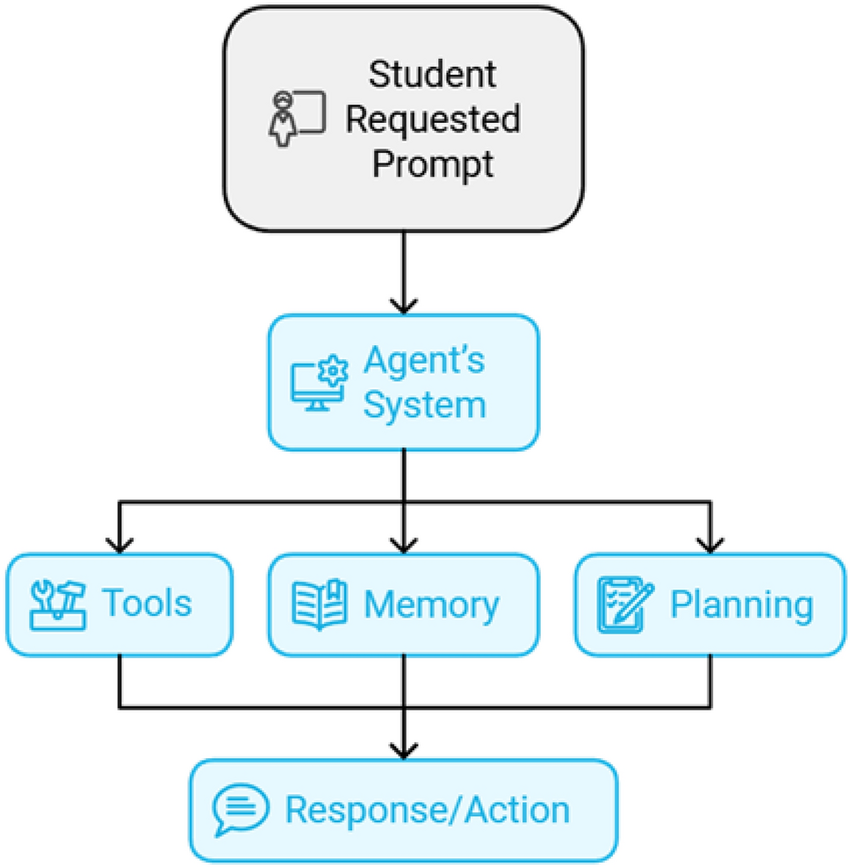
How LLM Real-Time Search Integration Works
The core idea is simple: equip the LLM with a search tool so it can fetch current information when needed, then incorporate it into its response.
A practical implementation usually contains:
- A search function (HTTP call to a search API)
- A tool wrapper (so the agent can call it)
- An agent prompt (rules for when/how to use the tool)
- An executor (runs the “think → tool → answer” loop)
Main Integration Options
| Solution | Advantages | Best for |
|---|---|---|
| LangChain Agent | Full agent framework; manages tool calls; supports multi-step reasoning | Complex questions; multi-step verification |
| Direct API Calling | Lightweight; simple; fast prototyping | Single-shot search; minimal reasoning |
| RAG System | Vector retrieval + LLM; supports large knowledge bases | Enterprise documents; manuals; internal knowledge |
Among these, LangChain Agent is the most versatile for search+LLM workflows, so this tutorial uses that approach.
Prerequisite: Get a Search API Key (serper.dev)
You’ll need an API key from serper.dev (used here as an example Google Search API provider). The search tool is just a function—if you want to switch providers later (SerpAPI, OpenSERP, etc.), you primarily replace that function.
Step 1: Implement a Search Function (Tool)
Below is a minimal search function using requests:
import requests
import json

# defining the query function, it will be used as tool by our agent
def query(q):
    url = "https://google.serper.dev/search"
    payload = json.dumps({"q": q})
    headers = {
        "X-API-KEY": "YOUR SERPER API KEY",
        "Content-Type": "application/json"
    }

    response = requests.request("POST", url, headers=headers, data=payload)
    return response.text
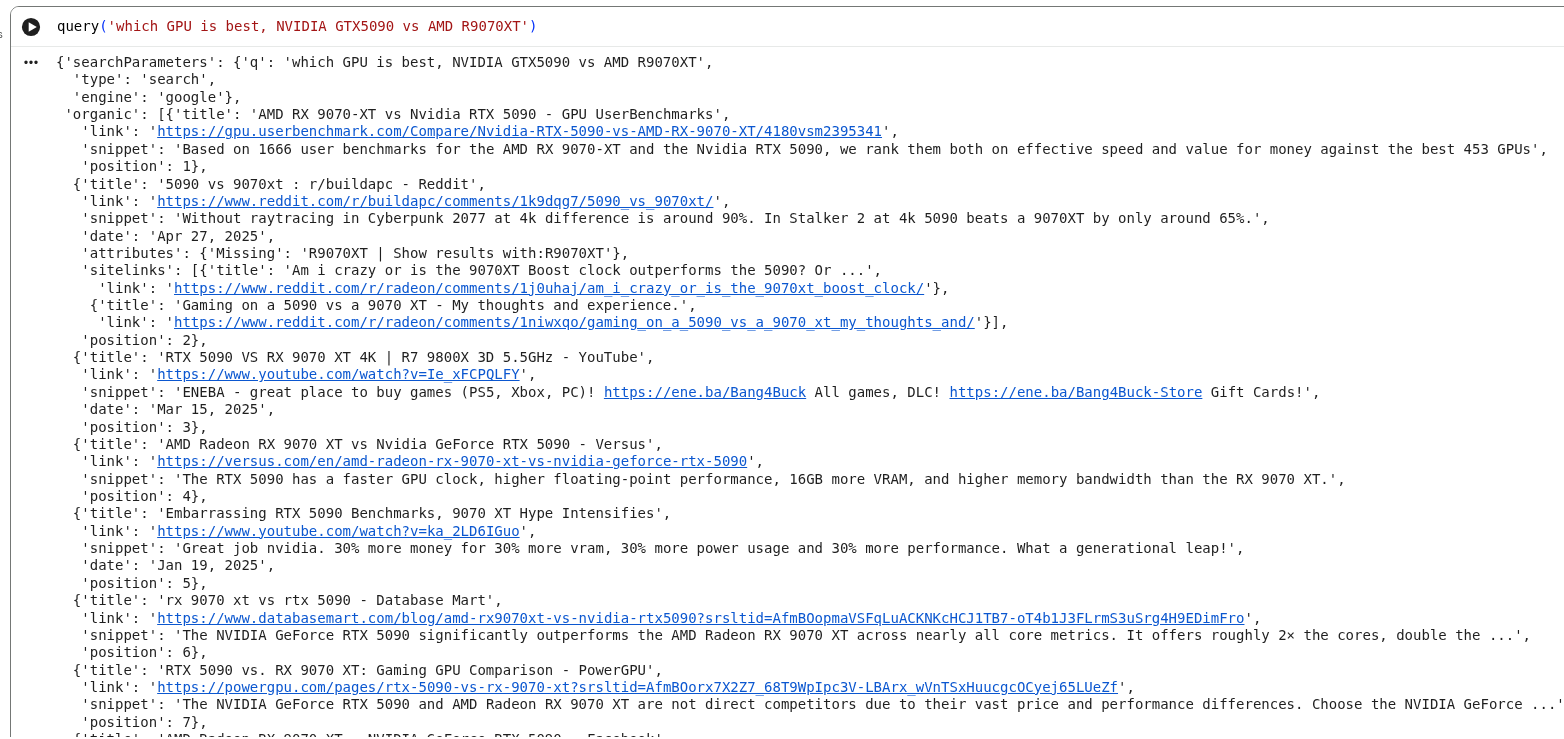
Example test:
query("which GPU is best, NVIDIA GTX5090 vs AMD R9070XT")
Step 2: Install / Import LangChain Dependencies
Import the core libraries used by the agent:
from langchain.agents import Tool
from langchain_openai import ChatOpenAI
from langchain.agents import AgentExecutor, create_openai_tools_agent
from langchain_core.prompts import ChatPromptTemplate, MessagesPlaceholder
Load your OpenAI key (example pattern):
from dotenv import load_dotenv
load_dotenv("../keys.env")
Step 3: Wrap Search as a LangChain Tool
tools = [
    Tool(
        name="search",
        func=query,
        description="useful for when you need to answer questions about current events. You should ask targeted questions"
    )
]
Step 4: Build an Agent That Decides When to Search
This agent binds:
- LLM (reasoning)
- Tools (capabilities)
- Prompt (rules)
# Choose the LLM that will drive the agent
llm = ChatOpenAI(model="gpt-3.5-turbo-1106")

prompt = ChatPromptTemplate.from_messages(
    [
        ("system", """You are a research assistant. Use your tools to answer questions.
If you do not have a tool to answer the question, say so.
You will be given a topic and your goal is that of finding highlights or possible 'click-baity' topics, that can be useful in explaining such topic to someone who isn't technical.
Within the documents you will analyse, please highlight in your summary all the possible slogans or AHA moments and also say where you found it.
Anything that can be useful as an example to better convey the idea of what is being discussed should be given back, with a summary too.
Provide your answer as a bullet point with these AHA/clickbaity topics.
Always explain why the AHA moment exists, and what is the reason someone is making such a claim.
"""),
        MessagesPlaceholder("chat_history", optional=True),
        ("human", "{input}"),
        MessagesPlaceholder("agent_scratchpad"),
    ]
)

agent = create_openai_tools_agent(llm, tools, prompt)
agent_executor = AgentExecutor(agent=agent, tools=tools, verbose=True)
Notes (kept aligned with your original explanation):
create_openai_tools_agentis designed for OpenAI tool-calling style workflows and is typically more stable than older agent patterns.AgentExecutororchestrates the full loop: input → decide → tool calls → output.
Step 5: Run a Query End-to-End
a = agent_executor.invoke({"input": "find 5 catchy headlines about AI agents"})
Example of what happens:
- Receives the input
- Decides it needs search
- Calls the tool
- Reads results
- Outputs bullet points with sources and rationale
Example log excerpt (truncated in your original; kept consistent here):
> Entering new AgentExecutor chain...

Invoking: `search` with `AI agents`
...
Then print output:
print(a["output"])
Example output format (as in your original):
Here are 5 catchy headlines about AI agents:
...
Google Colab Notebook
The complete code is available on Google Colab:
Because LangChain evolves rapidly, some functions may become incompatible across versions; in those cases you may need to pin or downgrade specific libraries.
Switching Providers: Replace the Search Function (SerpAPI Example)
If you prefer SerpAPI data, you can replace the search tool. Example (kept faithful to your original snippet and intent):
# 1. Import core libraries
import os
from getpass import getpass
from langchain_openai import ChatOpenAI
from langchain.agents import initialize_agent, AgentType
from langchain.tools import SerpAPIWrapper
from langchain.prompts import ChatPromptTemplate

# 2. Securely input API keys (avoid plaintext exposure)
OPENAI_API_KEY = getpass("Please enter your OpenAI API Key:")
SERPAPI_API_KEY = getpass("Please enter your SerpAPI Key:")

# 3. Initialize the SerpAPI search tool
search_tool = SerpAPIWrapper(
    serpapi_api_key=SERPAPI_API_KEY,
    params={
        "engine": "bing",
        "hl": "zh-CN",
        "gl": "cn",
        "num": 8,
        "q": "2025 AI Agents hot topics eye-catching headlines industry trends"
    }
)
Then register it as a tool:
tools = [
    Tool(
        name="search",
        func=search_tool,
        description="useful for when you need to answer questions about current events. You should ask targeted questions"
    )
]
If you are using a newer LangChain version, you can initialize the agent like this:
from langchain.agents import initialize_agent, AgentType

agent = initialize_agent(
    tools=[search_tool],
    llm=llm,
    agent=AgentType.CHAT_ZERO_SHOT_REACT_DESCRIPTION,
    verbose=True,
    handle_parsing_errors=True
)
To switch engines, adjust params={"engine":"bing"} or params={"engine":"google"} as needed.
FAQ
What is LLM real-time search integration?
It is a workflow where an LLM calls a search tool during inference to fetch current information, then synthesizes results into a grounded response.
Why use an agent instead of a simple API call?
Agents can decide when search is necessary and can perform multi-step retrieval and verification, which is useful for complex questions.
How does this relate to GEO (Generative Engine Optimization)?
AI engines increasingly generate answers with citations. Building content and systems that are structured, grounded, and citation-friendly increases the chance of being referenced in AI-generated responses.
Summary
This tutorial showed a practical LLM real-time search integration pattern using LangChain:
- Implement a search function (Serper or alternative)
- Wrap it as a tool
- Create an OpenAI tools agent
- Execute an end-to-end “search → synthesize” workflow
- Swap providers by replacing the search tool (SerpAPI example)