OpenSerp vs SerpAPI
The previously introduced SerpApi website (www.serpapi.com) provides SDK interface data, allowing LLM models to easily obtain search engine data.
However, SerpApi is a commercial data service provider. Although it offers 250 free monthly requests, once this free trial quota is exhausted, paid plans will be activated.
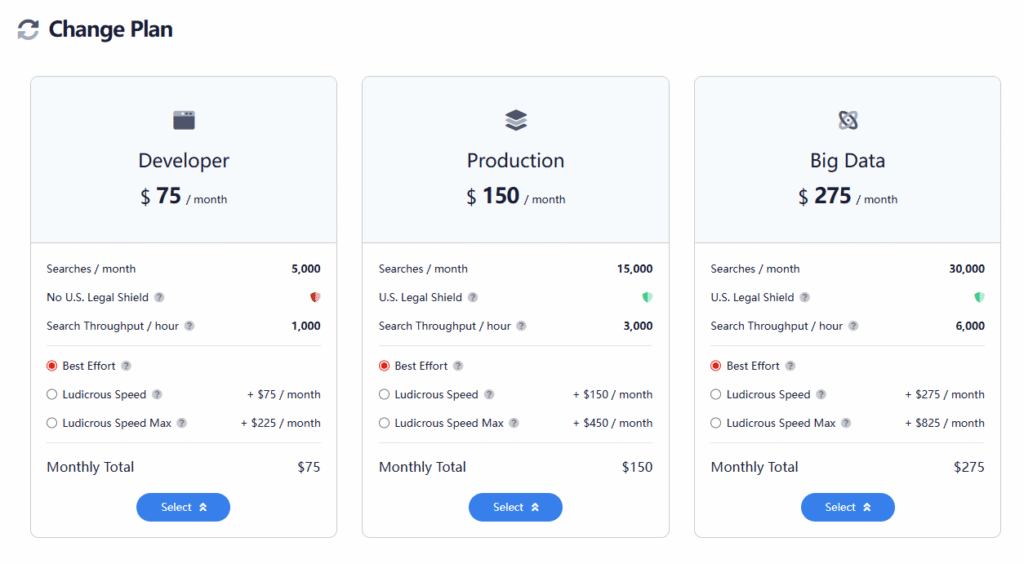
It doesn’t come cheap either – a $75 monthly plan only includes 5000 query calls. This volume is clearly insufficient for application scenarios where LLMs are frequently invoked.
Currently, there are some open-source alternatives to SerpAPI available. A popular one is OpenSerp, which can be deployed locally to freely access search engine results without any cost restrictions.
Official Repository
OpenSERP provides free API access to multiple search engines, including [Google, Yahoo, Baidu, Bing, DuckDuckGo]. Get comprehensive search results without expensive API subscriptions!
- Multi-engine support: Google, Yahoo, Baidu, Bing, DuckDuckGo, etc.
- Megasearch: Simultaneously aggregates results from multiple engines
- Image search: Supports image search functionality too!
- Advanced filtering: Language, date range, file type, site-specific search
- Proxy support: Supports HTTP/SOCKS5 proxies
- Docker-ready: Easy deployment via Docker
Local Deployment and Installation Process
Deployment using Docker
First, ensure Docker is installed locally, then run the following command:
# Run the API server via pre-built image
docker run -p 127.0.0.1:7000:7000 -it karust/openserp serve -a 0.0.0.0 -p 7000

# Or use docker-compose
docker compose up --build
You can also install from source code. Since this open-source OpenSerp is written in Golang, installing from source requires the Golang toolchain on your computer.
First, download the Go installation package from the Golang official website or a mirror site:
Golang website
Example: Download go1.24.5 linux-amd64 version
wget https://dl.google.com/go/go1.24.5.linux-amd64.tar.gzExtract to the specified directory
tar -C /usr/local -xzf go1.24.5.linux-amd64.tar.gzVerification
ls /usr/local/go/binIf the output shows go gofmt, the extraction was successful.
Configure Environment Variables
Modify the system configuration file /etc/profile or .zshrc
export PATH=$PATH:/usr/local/go/bin
export GOPATH=$HOME/go  # Custom Go workspace (modifiable); create the directory if it doesn't exist
export GOPROXY=https://goproxy.cn,direct  # Chinese mirror source to speed up dependency downloads
After saving, run source /etc/profile or source .zshrc to make the environment variables take effect.
Verify Successful Installation
# Check version (core verification)
go version
go env
If the output is similar to go version go1.24.5 linux/amd64, the installation was successful.
Now that the Go compilation environment is set up, you can proceed to compile the source code.
# Clone and build
git clone https://github.com/karust/openserp.git
cd openserp
go build -o openserp .

# Run the server
./openserp serve
Startup log output:
$ ./openserp serve
[2025-12-14 23:06:06][DEBUG] Final config: {App:{Host:0.0.0.0 Port:7000 Timeout:15 ConfigPath: IsBrowserHead:false IsLeaveHead:false IsLeakless:false IsDebug:false IsVerbose:true IsRawRequests:false ProxyURL: Insecure:true IsStealth:false} Config2Capcha:{ApiKey:123123123123123} GoogleConfig:{RateRequests:4 RateTime:0 RateBurst:2 SelectorTimeout:0 IsSolveCaptcha:true} YandexConfig:{RateRequests:4 RateTime:0 RateBurst:2 SelectorTimeout:0 IsSolveCaptcha:false} BaiduConfig:{RateRequests:4 RateTime:0 RateBurst:2 SelectorTimeout:0 IsSolveCaptcha:false} BingConfig:{RateRequests:4 RateTime:0 RateBurst:2 SelectorTimeout:0 IsSolveCaptcha:false} DuckDuckGoConfig:{RateRequests:4 RateTime:0 RateBurst:2 SelectorTimeout:0 IsSolveCaptcha:false}}
[2025-12-14 23:06:06][DEBUG] Browser options: {IsHeadless:true IsLeakless:false Timeout:15s LanguageCode: WaitRequests:false LeavePageOpen:false WaitLoadTime:2s CaptchaSolverApiKey:123123123123123 ProxyURL: Insecure:true UseStealth:false}
[2025-12-14 23:06:06][DEBUG] Browser found: true
[2025-12-14 23:06:06][DEBUG] Captcha solver initialized

 ┌───────────────────────────────────────────────────┐
 │                   Fiber v2.52.9                   │
 │               http://127.0.0.1:7000               │
 │       (bound on host 0.0.0.0 and port 7000)       │
 │                                                   │
 │ Handlers ............ 26  Processes ........... 1 │
 │ Prefork ....... Disabled  PID ............. 12646 │
 └───────────────────────────────────────────────────┘
OpenSerp starts on port 7000 by default. To change the port, add the -p parameter to the startup command:
./openserp serve -p 8000Once started, you can use the API for searches.
Megasearch simultaneously aggregates results from multiple engines with automatic deduplication.
Megaimage provides the same functionality for image searches!
Mega Search (Web Results)
# Search across all engines simultaneously
curl "http://localhost:7000/mega/search?text=golang&limit=10"

# Select specific engines
curl "http://localhost:7000/mega/search?text=golang&engines=duckduckgo,bing&limit=15"

# Advanced filtering
curl "http://localhost:7000/mega/search?text=Donald+Trump&engines=duckduckgo,bing&limit=20&date=20251005..20251005&lang=EN"
Sample output:
[
  {
    "rank": 1,
    "url": "https://en.wikipedia.org/wiki/Golden_Retriever",
    "title": "Golden Retriever - Wikipedia",
    "description": "The Golden Retriever is a Scottish breed of retriever dog of medium size. It is characterised by a gentle and affectionate nature and a striking golden coat. It is a working dog, and registration is subject to successful completion of a working trial. [2] It is commonly kept as a companion dog and is among the most frequently registered breeds in several Western countries; some may compete in ...",
    "ad": false,
    "engine": "duckduckgo"
  },
  {
    "rank": 2,
    "url": "https://www.bing.com/ck/a?!&&p=6f15ac4589858d0a104cd6f55cc8e91e8d8d6da91f905b626921f67f2323a467JmltdHM9MTc1OTE5MDQwMA&ptn=3&ver=2&hsh=4&fclid=2357c2f4-6131-68de-359f-d48c607c691d&u=a1aHR0cHM6Ly93d3cuZ29sZGVucmV0cmlldmVyZm9ydW0uY29tL3RocmVhZHMvdW5kZXJzdGFuZGluZy13aHktZ29sZGVuLXJldHJpZXZlciVFMiU4MCU5OXMtbGlmZXNwYW4taGFsdmVkLWluLXRoZS1sYXN0LTM1LXllYXJzLjM1NzMyMi8&ntb=1",
    "title": "Golden Retriever Dog Forums\nhttps://www.goldenretrieverforum.com › threads › understanding-why-g…",
    "description": "Oct 20, 2024 · Back in the 1970s, Golden Retrievers routinely lived until 16 and 17 years old, they are now living until 9 or 10 years old. Golden Retrievers seem to be dying mostly of bone …",
    "ad": false,
    "engine": "bing"
  },
  {
    "rank": 3,
    "url": "http://www.baidu.com/link?url=2544q3ugc68j0scVxdpWCSX-gl2AmuCy1l7uRR3loIfS1hmJWMiJKW4MDGWoZrLE7X-ybu1L7T8PspoL7iy_dK",
    "title": "golden retrievers是什么意思_golden retrievers怎么读_解释_用法...",
    "description": "\n\n2025年9月21日golden retrievers 读音:美英 golden retrievers基本解释 金毛猎犬 分词解释 golden金(黄)色的 retrievers寻猎物犬( retriever的名词复数 ) 词组短语 golden retrieversfor sale出售金毛寻回犬 golden retrieversnear me我附近的金毛寻回犬 golden retrieverspuppies金毛寻回犬幼犬...\ndanci.gei6.com/golden...retrievers...",
    "ad": false,
    "engine": "baidu"
  }
]
Since the server is running in a Chinese region, the search results include Chinese content. Although the lang=en parameter was added, it seems ineffective in the results.
Convert the curl request to a Python requests call:
import requests
from requests.exceptions import RequestException

def get_mega_search_results():
    """
    Call OpenSERP's mega/search endpoint to get search results based on specified criteria
    Returns: dict/None - Returns JSON result on success, None on failure
    """
    # Base URL of the endpoint
    base_url = "http://localhost:7000/mega/search"

    # Construct request parameters (corresponding to query parameters in curl)
    params = {
        "text": "Donald Trump",  # Search keyword (Donald+Trump in curl corresponds to a space)
        "engines": "duckduckgo,bing",  # Specify search engines
        "limit": 20,  # Number of results
        "date": "20251005..20251005",  # Date range
        "lang": "EN"  # Language
    }

    try:
        # Send GET request (curl uses GET by default)
        response = requests.get(
            url=base_url,
            params=params,
            timeout=30  # Set timeout to avoid infinite waiting
        )

        # Check response status code
        response.raise_for_status()  # Throws exception for non-200 status codes

        # Parse JSON response (endpoint returns JSON format)
        result = response.json()
        print("Request successful, returning results:")
        return result

    except RequestException as e:
        # Catch all request-related exceptions (timeout, connection failure, status code errors, etc.)
        print(f"Request failed: {str(e)}")
        return None

# Call the function and print results
if __name__ == "__main__":
    search_result = get_mega_search_results()
    if search_result:
        # Example: Iterate and print first 3 results
        for idx, item in enumerate(search_result[:3], 1):
            print(f"\nResult {idx}:")
            print(f"Rank: {item.get('rank')}")
            print(f"URL: {item.get('url')}")
            print(f"Title: {item.get('title')}")
            print(f"Description: {item.get('description')}")
Query available search engines
curl "http://localhost:7000/mega/engines"Available engines: google, yandex, baidu, bing, duckduckgo
You can search for images using image queries:
# Search images across ALL engines
curl "http://localhost:7000/mega/image?text=golang logo&limit=20"
Single engine examples
# DuckDuckGo search
curl "http://localhost:7000/duck/search?text=golang&limit=7"

# Google search
curl "http://localhost:7000/google/search?text=golang&lang=EN&limit=10"
Search Parameters
| Parameter | Description | Example |
|---|---|---|
text | Search query | golang programming |
lang | Language code | EN, DE, RU, ES |
date | Date range | 20230101..20231231 |
file | File extension | PDF, DOC, XLS |
site | Site-specific search | github.com, stackoverflow.com |
limit | Number of results | 10, 25, 50 |
answers | Include Q&A results | true, false |
You can add these parameters to the params in the Python code above:
params = {
    "text": "Donald Trump",  # Search keyword (Donald+Trump in curl corresponds to a space)
    "engines": "duckduckgo,bing",  # Specify search engines
    "limit": 20,  # Number of results
    "date": "20251005..20251005",  # Date range
    "lang": "EN"  # Language
}
Proxy Support
OpenSERP supports authenticated HTTP and SOCKS5 proxies:
# SOCKS5 proxy
./openserp serve --proxy socks5://127.0.0.1:1080

# Authenticated HTTP proxy
./openserp search bing "query" --proxy http://user:[email protected]:8080
This is particularly useful for countries with restricted access to Google.
Add proxy settings to Python code:
proxies = {
    "http": "socks5://127.0.0.1:1080",  # SOCKS5 proxy
}
response = requests.get(base_url, params=params, proxies=proxies, timeout=30)
Using Authenticated HTTP proxy
proxies = {
    "https": "http://user:[email protected]:8080"  # Authenticated HTTP proxy
}
response = requests.get(base_url, params=params, proxies=proxies, timeout=30)
In addition to using curl and Python code to query the search engine API, OpenSerp can also be used directly as a command-line search engine:
openserp search google "how to write first Goang hello world program?"Pretty cool, right? Turn Google into a CLI tool!