
In the previous article, we demonstrated using Levenshtein distance and TF-IDF + cosine similarity to determine the similarity between two texts.
Next, we continue to explore more advanced techniques for judging text similarity.
sentence-transformers
The core principle of sentence-transformers is to map text (sentences, paragraphs, or even long documents) into a high-dimensional vector space, so that semantically similar texts are closer in the vector space, enabling fast calculation of text similarity through vector operations (such as cosine similarity). It is based on pre-trained language models (such as BERT, RoBERTa, etc.) and is optimized to better capture sentence-level semantics.
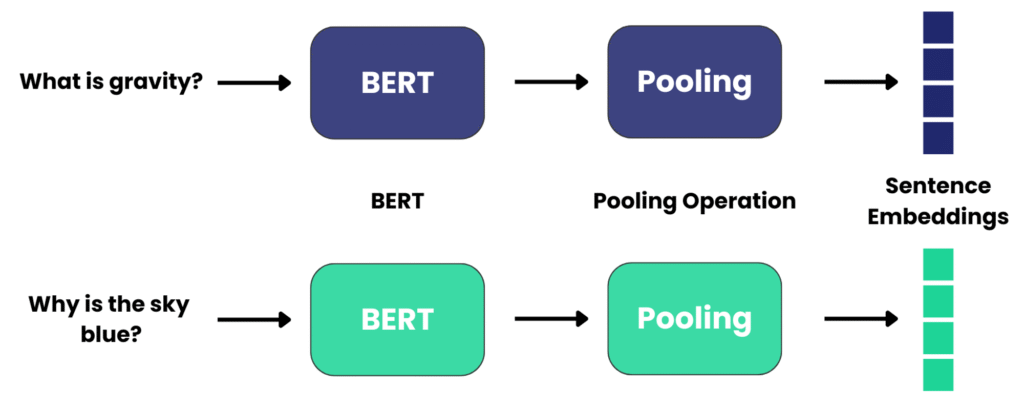
1. Text Encoding Based on Pre-trained Language Models
sentence-transformers does not train models from scratch, but reuses existing language models trained on massive amounts of data (such as BERT, MiniLM, etc.) as the foundation. These models have been pre-trained on vast amounts of text and already possess the ability to understand vocabulary, grammar, and basic semantics.
- Text encoding process:
Input text (such as a sentence) is first split into subwords by a tokenizer, then fed into the pre-trained model, and finally generates a vector representation (Embedding) of the text.
For example, the sentence “I love natural language processing” will be converted into a fixed-length vector (such as 384 dimensions or 768 dimensions).
2. Sentence-Level Semantic Optimization (Pooling Layer)
The output of pre-trained language models (such as BERT) is vectors for each subword (for example, BERT generates a vector for each word in the sentence), while sentence-transformers requires a single vector for the entire sentence. Therefore, it combines multiple subword vectors into a single sentence vector through a “pooling” operation:
- Common pooling strategies:
- Mean Pooling: Takes the average of all subword vectors (most commonly used), which balances the contribution of each word in the sentence.
- Max Pooling: Takes the maximum value of each dimension, highlighting key information in the sentence.
- CLS Pooling: Directly uses the vector of the model’s first special symbol
[CLS](applicable to some models, such as BERT). Example: The subword vectors of the sentence “The cat chases the dog” after mean pooling result in a vector that can represent the semantics of the entire sentence.
3. Fine-tuning to Improve Semantic Relevance
To make vectors more accurately reflect sentence-level semantic similarity, sentence-transformers performs secondary training (fine-tuning) on the basic pre-trained model using annotated data containing sentence pairs (such as similar sentence pairs, question-answer pairs).
- Training objectives:
To make the vectors of semantically similar sentences closer and those of semantically irrelevant sentences farther apart. Common training objectives include: - Contrastive Learning: Treats similar sentence pairs as positive samples and dissimilar ones as negative samples to optimize the distribution in the vector space.
- Triplet Loss: For each sentence (anchor), 拉近 the distance with positive samples (similar sentences) and increase the distance with negative samples (dissimilar sentences). After fine-tuning, the model can better capture complex semantic relationships such as “synonymous sentences” and “hyponymous sentences”.
4. Vector Similarity Calculation
After generating sentence vectors, the similarity between two vectors is calculated using cosine similarity (or Euclidean distance, etc.), where a value closer to 1 indicates more similar semantics.
Now that we have introduced the basic principles of sentence-transformers, let’s use a basic example to demonstrate how to use it and its running results.
Installation
First, we install the sentence-transformers library using pip.
pip install sentence-transformersThe default installation is the CPU version, and the PyTorch library will be installed during the process. It will be installed in a moment.
By default, sentence-transformers does not come with any models. The first time you call it, it will download the model from Hugging Face to your local machine.
Example
The three sentences we test are:
text_a = "Artificial intelligence is transforming modern society through automation and data analysis."

text_b = "Machine learning algorithms are changing contemporary culture by automating processes and analyzing information."

text_c = "Climate change affects global weather patterns and requires immediate environmental action."
The verification code is as follows:
from sentence_transformers import SentenceTransformer, util

MODEL_PATH = './local-models/all-MiniLM-L6-v2'  # Path to a lightweight model suitable for CPU

def calculate_similarity(text1, text2, model):
    """
    Calculate cosine similarity between two texts using a pre-trained model

    Parameters:
        text1 (str): First text to compare
        text2 (str): Second text to compare
        model: Pre-loaded SentenceTransformer model

    Returns:
        float: Cosine similarity score between 0 and 1
    """
    # Generate embeddings for both texts
    embedding1 = model.encode(text1, convert_to_tensor=True)
    embedding2 = model.encode(text2, convert_to_tensor=True)

    # Calculate and return cosine similarity
    return util.cos_sim(embedding1, embedding2).item()


def main():
    # Define the three texts for comparison
    text_a = "Artificial intelligence is transforming modern society through automation and data analysis."
    text_b = "Machine learning algorithms are changing contemporary culture by automating processes and analyzing information."
    text_c = "Climate change affects global weather patterns and requires immediate environmental action."

    # Load a pre-trained SentenceTransformer model
    # Using a lightweight model suitable for general purpose similarity tasks
    model = SentenceTransformer(MODEL_PATH)

    # Calculate similarity scores
    similarity_ab = calculate_similarity(text_a, text_b, model)
    similarity_ac = calculate_similarity(text_a, text_c, model)

    # Display results with formatted output
    print(f"Text A: {text_a}\n")
    print(f"Text B: {text_b}")
    print(f"Similarity between A and B: {similarity_ab:.4f}")
    print("\n" + "-"*50 + "\n")
    print(f"Text C: {text_c}")
    print(f"Similarity between A and C: {similarity_ac:.4f}")

    # Provide a simple interpretation of the results
    print("\nInterpretation:")
    print(f"- A and B are {'highly similar' if similarity_ab > 0.7 else 'moderately similar' if similarity_ab > 0.4 else 'not very similar'}")
    print(f"- A and C are {'highly similar' if similarity_ac > 0.7 else 'moderately similar' if similarity_ac > 0.4 else 'not very similar'}")

if __name__ == "__main__":
    main()
Save the above code as a Python file. The first time you run it, the all-MiniLM-L6-v2 model will be downloaded automatically.
Then analyze and judge text_a, text_b, and text_c.
The output result is:
Similarity between A and B: 0.6630
Similarity between A and C: 0.1917

Interpretation:
- A and B are moderately similar
- A and C are not very similar
Semantically, the results are as expected.
For judging non-English languages, there are corresponding models available for download, which also work well.
For example, Chinese-specific models: uer/sbert-base-chinese-nli, multilingual models: paraphrase-multilingual-MiniLM-L12-v2, supporting more than 50 languages.
Using sentence_transformers models for complex text similarity judgment (such as academic plagiarism detection, question-answering system matching) can handle “synonymous sentence rewriting”, “cross-sentence expression”, and even understand some ambiguities (such as judging the meaning of “apple” in context). It is the preferred solution in the industry.
How to train your own model based on sentence-transformers?
Although the pre-trained models of sentence-transformers already have general semantic understanding capabilities, they still need to be fine-tuned for specific scenarios in practical applications. The core reason is that general models cannot perfectly adapt to all tasks and domains, and fine-tuning can make the model better meet specific needs.
Specifically, there are several main reasons:
1. There is a gap between the “generalization” of general models and the “specificity” of actual tasks
Pre-trained models (such as all-MiniLM-L6-v2 or the Chinese uer/sbert-base-chinese-nli) are trained on massive general corpora (such as news, books, web pages, etc.) with the goal of learning “general semantic rules”. However, actual tasks often have specific scenarios:
- Domain differences: For example, terms like “blood pressure” and “lesion” in the medical field, and “litigation” and “jurisdiction” in the legal field. The semantics of these professional terms may not be fully learned in general models.
- Task differences: General models are good at “general semantic similarity”, but specific tasks may require special judgment logic (such as “emotional similarity of e-commerce reviews”, “customer service question-answer matching”).
For example, a general model may consider “The doctor prescribed medicine to the patient” and “The patient obtained medicine from the doctor” to be highly semantically similar, but in medical question-answering scenarios, more attention may need to be paid to details such as “the compliance of the prescription process”. At this time, fine-tuning can align the model with the task goals.
Experiments show that on specific tasks, the performance (such as accuracy, F1 score) of fine-tuned models is usually 10%-30% higher than that of general models, or even more.
How to fine-tune?
Key Steps Explanation
- Data Preparation
- The core is to build a dataset containing sentence pairs and similarity labels (labels usually range from 0 to 1)
- Data sources can be manually annotated similar sentence pairs, question-answer matching data, etc.
- The example uses simple Chinese sentence pairs. In practical applications, it is recommended to prepare at least thousands of samples to ensure effectiveness
- Base Model Selection
- For Chinese scenarios, it is recommended to use
uer/sbert-base-chinese-nliorshibing624/text2vec-base-chinese - For multilingual scenarios,
paraphrase-multilingual-MiniLM-L12-v2can be selected - The base model determines the starting point of fine-tuning, and choosing a model related to the task domain will yield better results
- Loss Function Selection
- CosineSimilarityLoss: Suitable for regression tasks (predicting similarity between 0 and 1)
- ContrastiveLoss: Suitable for classification tasks (judging whether sentence pairs are similar)
- TripletLoss: Used when data is in triplets (anchor sentence + positive example sentence + negative example sentence)
- Training Parameter Adjustment
batch_size: Adjust according to video memory size, usually 2-32num_epochs: Generally 10-50 epochs, need to observe overfitting through the validation setwarmup_steps: Learning rate warm-up steps, usually set to 10% of the total steps
- Model Evaluation and Optimization
- Monitor performance through
EmbeddingSimilarityEvaluatorduring training - If overfitting occurs, reduce the number of training epochs, increase the amount of data, or use regularization (such as dropout)
- The fine-tuned model will be saved to
output_pathand can be directly used for subsequent inference
Notes
- Fine-tuning requires a certain amount of annotated data (at least 1000 samples are recommended), and data quality directly affects the effect
- If video memory is insufficient, reduce
batch_sizeor choose a smaller base model (such as theMiniLMseries) - For specific domains (such as medical, legal), further fine-tuning with in-domain corpora can improve the effect
Through the above process, you can adjust the pre-trained model to a sentence vector model more suitable for specific Chinese scenarios and improve the accuracy of semantic similarity calculation.
Next, we use the original model all-MiniLM-L6-v2 for fine-tuning. For simplicity, we only use 6 new comparison sentences for fine-tuning.
In actual projects, the more comparison sentences added, the better.
The format is as follows:
{"sentence1": "Natural language processing enables chatbots", "sentence2": "NLP powers conversational AI systems", "score": 0.93}The fine-tuning code is as follows:
from sentence_transformers import SentenceTransformer, InputExample, losses, evaluation, util
from torch.utils.data import Dataset, DataLoader
import pandas as pd
import random

# ----------------------
# 1. Custom map-style dataset
# ----------------------
class CustomDataset(Dataset):
    """Custom dataset class that supports index access and length retrieval"""
    def __init__(self, examples):
        self.examples = examples

    def __len__(self):
        return len(self.examples)

    def __getitem__(self, idx):
        return self.examples[idx]

# ----------------------
# 2. Prepare training data
# ----------------------
# Example training data: English sentence pairs with similarity scores (0-1)
data = [
    {"sentence1": "Artificial intelligence is transforming healthcare", "sentence2": "AI is revolutionizing medical services", "score": 0.91},
    {"sentence1": "Python is a popular programming language", "sentence2": "Java is widely used in software development", "score": 0.45},
    {"sentence1": "Climate change affects global weather patterns", "sentence2": "Global warming impacts worldwide climate systems", "score": 0.87},
    {"sentence1": "Machine learning algorithms improve with more data", "sentence2": "More data enhances ML model performance", "score": 0.89},
    {"sentence1": "Renewable energy reduces carbon emissions", "sentence2": "Fossil fuels contribute to greenhouse gases", "score": 0.32},
    {"sentence1": "Natural language processing enables chatbots", "sentence2": "NLP powers conversational AI systems", "score": 0.93},
]

df = pd.DataFrame(data)

# Create training examples and shuffle order
train_examples = [
    InputExample(
        texts=[row["sentence1"], row["sentence2"]],
        label=row["score"]
    ) for _, row in df.iterrows()
]
random.shuffle(train_examples)

# Create data loader
train_dataset = CustomDataset(train_examples)
train_dataloader = DataLoader(train_dataset, shuffle=True, batch_size=2)

# ----------------------
# 3. Load base model (all-MiniLM-L6-v2)
# ----------------------
model = SentenceTransformer("all-MiniLM-L6-v2")

# ----------------------
# 4. Configure training parameters
# ----------------------
# Define cosine similarity loss function
train_loss = losses.CosineSimilarityLoss(model)

# Configure evaluator
evaluator = evaluation.EmbeddingSimilarityEvaluator(
    sentences1=df["sentence1"].tolist(),
    sentences2=df["sentence2"].tolist(),
    scores=df["score"].tolist(),
    name="train-eval"
)

# Training parameter settings
num_epochs = 15
warmup_steps = int(len(train_dataloader) * num_epochs * 0.1)  # 10% of total steps
output_path = "./fine-tuned-all-MiniLM-L6-v2"  # Path to save fine-tuned model

# ----------------------
# 5. Execute training
# ----------------------
model.fit(
    train_objectives=[(train_dataloader, train_loss)],
    evaluator=evaluator,
    epochs=num_epochs,
    warmup_steps=warmup_steps,
    output_path=output_path,
    show_progress_bar=True,
    evaluation_steps=3  # Evaluate every 3 steps
)

# ----------------------
# 6. Test the fine-tuned model
# ----------------------
# Load the fine-tuned model
fine_tuned_model = SentenceTransformer(output_path)

# Test sentence pairs
test_sentence1 = "Deep learning is a subset of machine learning"
test_sentence2 = "Machine learning includes deep learning approaches"

# Generate embeddings and calculate similarity
embedding1 = fine_tuned_model.encode(test_sentence1, convert_to_tensor=True)
embedding2 = fine_tuned_model.encode(test_sentence2, convert_to_tensor=True)
similarity_score = util.cos_sim(embedding1, embedding2).item()

print(f"Test Sentence 1: {test_sentence1}")
print(f"Test Sentence 2: {test_sentence2}")
print(f"Similarity Score: {similarity_score:.4f}")
After a short training period, a new model file /fine-tuned-all-MiniLM-L6-v2 will be generated in the current directory.
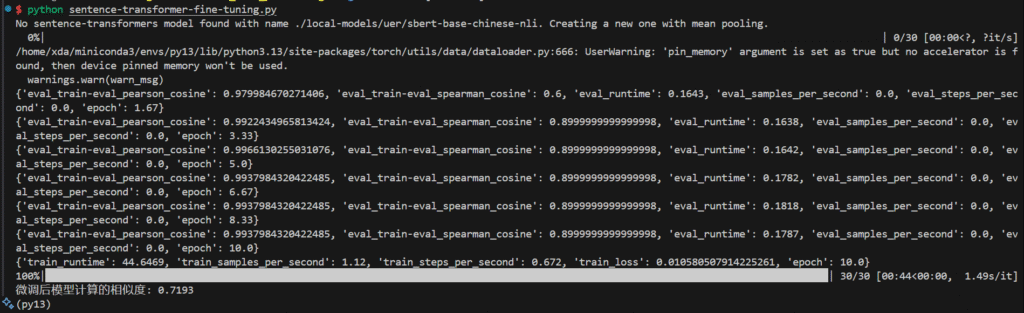
If your PC has an NVIDIA GPU, the fine-tuning training speed will be much faster.